Does Life360 detect fake GPS? What it checks
Does Life360 detect fake GPS? What it looks for: the mock flag, GPS-vs-network conflicts, impossible jumps, and why a real RF fix leaves no marker.
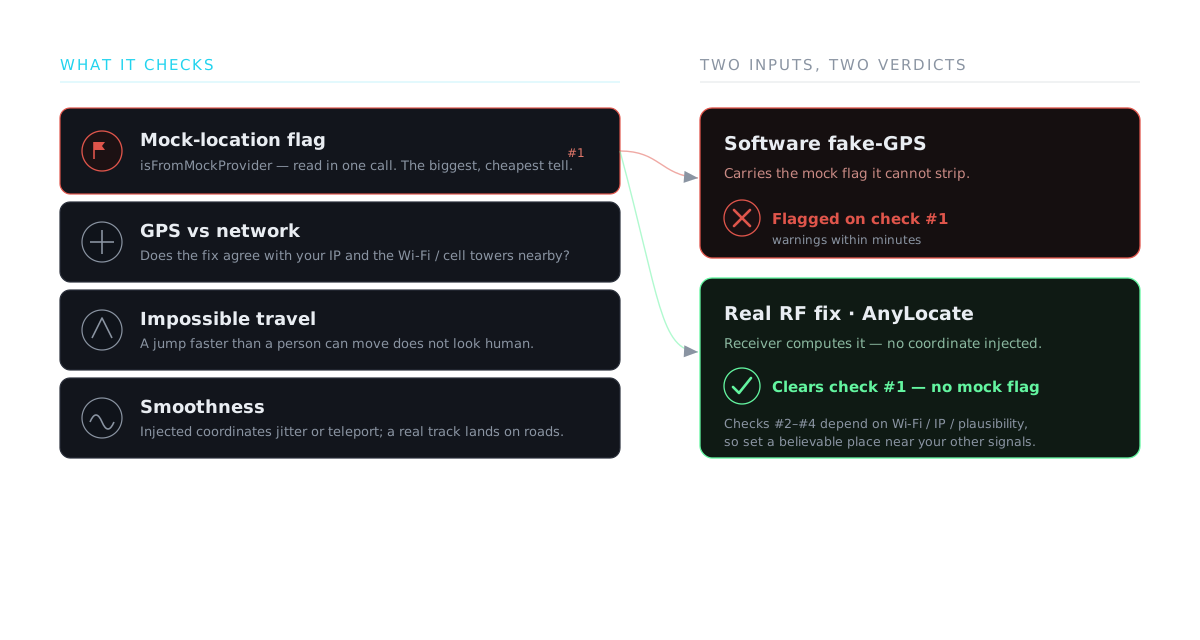
Short answer: Life360 can detect the common kind of fake GPS, the software kind, and it’s built to. Whether your method gets caught depends entirely on which layer it operates at. Here’s what the app actually looks for.
The mock-location flag is the easy catch
Almost every free “fake GPS” app changes your location through Android’s developer mock-location path. The operating system stamps every location produced that way with a flag, isFromMockProvider, and Life360 can read it in a single call. That’s why people see spoofing warnings within minutes: the flag travels with the fake fix, and the app injecting it can’t strip it off.
What else it cross-checks
The mock flag isn’t the only signal. Family-tracking apps increasingly compare the GPS fix against everything else the phone knows:
- GPS vs network. If the satellite position says one city but your IP and the Wi-Fi/cell towers around you say another, that conflict is a red flag.
- Impossible travel. A location that jumps hundreds of kilometres between updates, or moves faster than a person can, doesn’t look human.
- Smoothness. Injected coordinates tend to teleport or jitter; a real track lands on roads and moves continuously.
Why a real RF fix reads differently
AnyLocate doesn’t inject a coordinate, so there’s nothing for the biggest check to find. It broadcasts an authentic GPS signal and the phone’s own receiver computes the fix, with no isFromMockProvider flag, no mock-location setting, no root. The position sits on real streets and updates smoothly, because the receiver produced it the normal way, so the mock-flag and injected-jitter tells simply aren’t there.
The honest part
Removing the mock flag is not the same as beating every check. A phone reads a fused location (satellite plus Wi-Fi and cell), so outside a shielded setup, nearby Wi-Fi and towers are a factor a positioning tool doesn’t control. Impossible jumps are still impossible. Present a believable place near where the rest of your signals point, and the satellite layer reads as simply where you are. Push it to the other side of the planet while your IP and Wi-Fi say otherwise, and that’s a different problem, one AnyLocate doesn’t claim to solve. See how GPS spoofing works for the full mechanism.